
The label is printed, then applied — in one pass
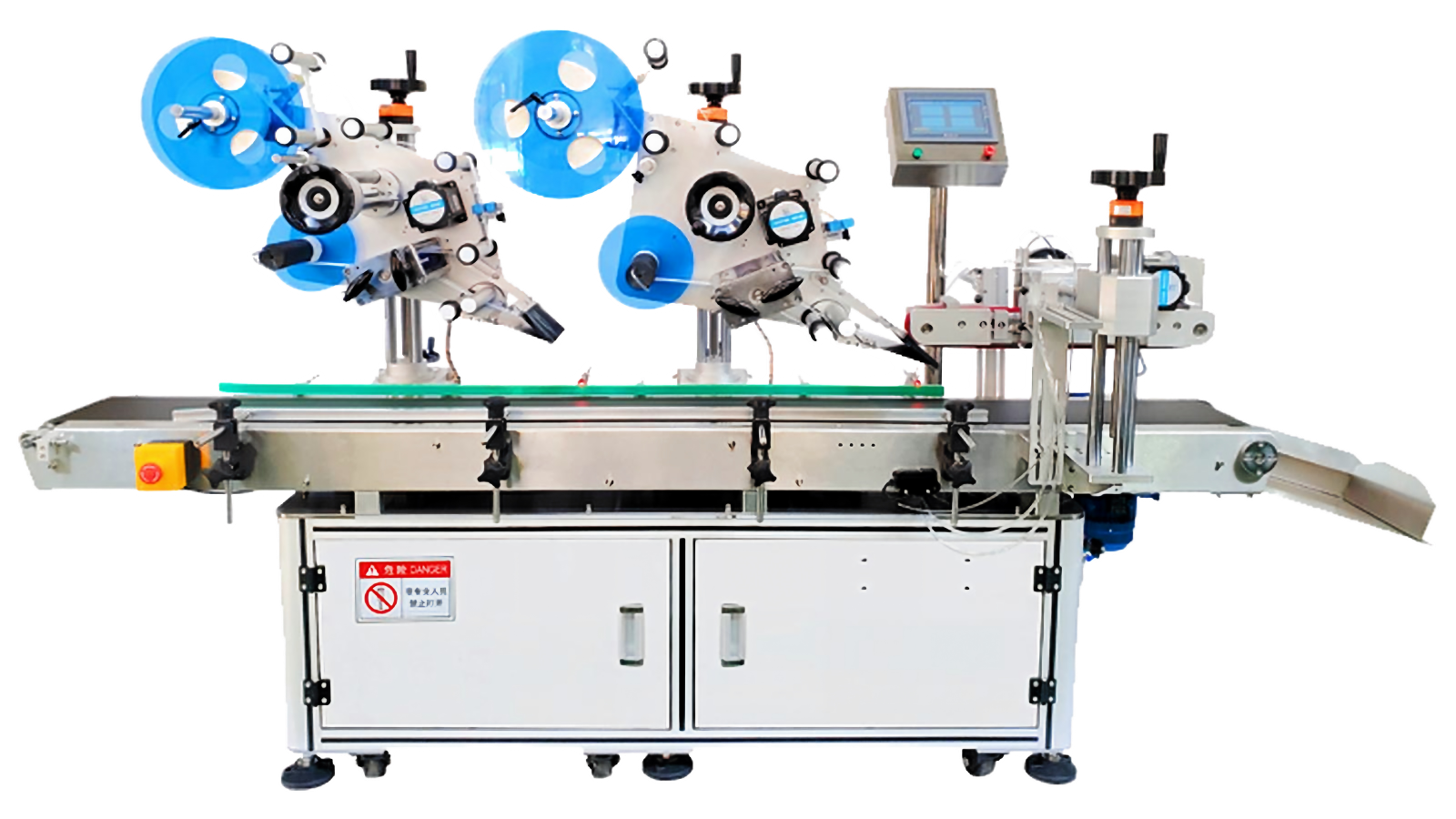
Most labelers apply a pre-printed roll, which means every SKU change waits for a print run. This one prints the label on the line and applies it in the same cycle: up to 160 packs a minute, ±1 mm on X and Y, and 300 DPI as standard with 600 DPI optional. Change the order number or the date in the recipe, and the next pack carries it.
Packs per minute,
upper rate
X and Y placement,
±0.5° angle
Print resolution
standard, 600 optional
Conveyor height,
300–900 adjustable
Two models, and the bottle picks for you
Both run the same print engine at the same rate — the difference is the fixture. A round bottle needs a rotary fixture so the label follows the curve without wrinkling at the seam; a carton only needs a pressure belt. Read the shape column first, because that is the only place these two actually differ.
- Rate is a ceiling, not a promise — your label length and pack spacing set the real figure
- Both models share the same print engine, so print quality is not a reason to pick one over the other
- Both are built on the same frame in our own plant; only the applicator and fixture change
What it can and cannot label
A labeling machine is easy to sell and hard to make work, because the failure mode is always the same: the label bridges a curve instead of following it, and the edge lifts within a day. Three shape families, and what each one needs.
Round bottles and cylinders
The label has to bend around the curve. A rotary fixture turns the bottle as the label is applied, so it follows the surface instead of bridging it — which is what causes the wrinkles and lifted edges you see on a flat applicator.
Square and rectangular cartons
A flat face takes a flat applicator. This is the easy case, and the one where the rate figure is most often reached, because the pack presents the same face every cycle and the label does not have to follow a curve.
Oval and tapered shapes
The hardest case, and the one worth sending a sample for. An oval has two tight curvature zones and two nearly flat ones, so the applicator speed has to change across the label — we set that from your actual bottle, not from a table.
What the machine prints, and how well
This is the part a pre-printed label applicator does not have, and the part that decides whether your label passes a retail or pharma scan check. Four figures worth checking against your own label before you order.
Barcode-scan grade as standard, 600 DPI if you need it
300 DPI reaches barcode grading of B or better, which is what most retail and pharma customers specify. 600 DPI takes that to A grade and is worth paying for only when the label carries a small 2D code or fine print that has to survive a scanner.
- 300 DPI standard — barcode grade ≥ B
- 600 DPI optional — grade ≥ A
- Bitmaps supported at 300 DPI and above
Label width 25 to 104 mm, length 15 to 110 mm
That range covers a small pharma vial label and a shipping carton label on the same machine, which is unusual at this price. If your label sits outside it, tell us before the order — the print engine is a fixed component, not a setting.
- Width 25–104 mm
- Length 15–110 mm
- Print and apply in the same cycle
Industrial thermal transfer, with thermal-sensitive as an option
Thermal transfer uses a ribbon and holds up to rubbing, moisture and sunlight — the reason it is the default for anything that leaves the building. The optional thermal-sensitive mode drops the ribbon, which is cheaper per label but fades when exposed to heat or light.
- Thermal transfer standard, with ribbon
- Thermal-sensitive mode optional, carbonless tape
- Static text, variable data, barcodes, 2D codes, bitmaps
Local storage for 100 print recipes, USB import and export
A recipe holds everything a label needs: the layout, the variable fields, the print settings. Store a hundred of them locally and move them between machines by USB, so a second line does not have to be rebuilt field by field.
- 100 print recipes held locally
- USB import and export
- RS485 and Ethernet, Modbus-TCP / Profinet
- Transmission delay ≤ 100 ms
a vial label and a carton label, same machine
The label is a consumable, and it decides the running cost
A print-and-apply machine moves the cost from the label supply house to your own floor: you buy blank stock and ribbon, and print only the labels you need. That is the real argument for this type over a pre-printed applicator — not the speed, and not the precision, but the fact that a change of date or order number costs nothing but a recipe edit instead of a print run and a wasted roll.
- Label width 25–104 mm, length 15–110 mm — the same engine covers both ends
- Thermal transfer ribbon standard; thermal-sensitive stock is a cheaper option that fades in heat
- Unlabeled-item detection at a rate of 0.01% or lower, so a missed label is caught, not shipped
- Duplicate and missing-label checks run in the same pass, without slowing the line
From data to a verified label
The cycle is short, and the interesting part is not the mechanical motion — it is that the label does not exist until the pack is in front of the head. That is what makes a date change free and a pre-printed roll obsolete.
Pack arrives, data ready
The pack reaches the applicator on the conveyor. The recipe for this product is already loaded, with the variable fields — order number, date, batch — filled from the line or from the touchscreen.
The print engine produces the label at 300 DPI as the pack approaches. Printing happens on demand rather than from a pre-printed roll, so the label carries the data for this pack, not for the run.
Detect and apply
A sensor confirms the pack is in position, and the applicator applies the label at ±1 mm on X and Y. On a round bottle the rotary fixture turns the pack so the label follows the curve instead of bridging it.
Verify
An inspection step checks that a label is present and correct. An unlabeled pack is detected at a rate of 0.01% or lower and flagged, so the failure is caught at the machine rather than at the customer.
Every figure, on one page
Both models share these figures — the only difference is the applicator fixture, which is described in section 01. Where a value would depend on your label or your pack, it is not listed, and we will answer it directly.
| ParameterXINTU XT-LB260 | ValuePrint & apply labeler |
|---|---|
| Performance | |
| Labeling rate | up to 160 packs/min |
| Labeling accuracy | X/Y ±1 mm, angle ±0.5° |
| Unlabeled-item detection | rate ≤ 0.01 % |
| Print engine | |
| Print technology | Thermal transfer (standard), thermal-sensitive (optional) |
| Print and apply | Simultaneous, single cycle |
| Resolution | 300 DPI standard, 600 DPI optional |
| Print width | 25 – 104 mm |
| Print length | 15 – 110 mm |
| Printable content | Static text, variable data, barcodes, 2D codes, bitmaps (BMP/JPG) |
| Bitmaps | ≥ 300 DPI |
| Data storage | 100 print recipes, local, USB import/export |
| Interface and control | |
| Data interface | RS485, Ethernet (Modbus-TCP / Profinet) |
| Transmission delay | ≤ 100 ms |
| PLC | Siemens |
| HMI | Touchscreen, Kunlun Tongzhi |
| Remote control | Supported |
| Installation | |
| Type | Floor-standing |
| Conveyor height | 600 mm, adjustable 300 – 900 mm |
| Dimensions, L × W × H | 2600 × 700 × 1900 mm |
| Weight | 230 kg |
| Power | 220 V single phase, 900 W |
| Compliance and service | |
| Certification | CE |
| Warranty | 1 year |
| After-sales | Video technical support, online support |
| Spare parts | Overseas stock |
| Factory inspection | Video inspection available; mechanical test report available |
What the machine needs from your line
A labeler goes into an existing conveyor line, so the constraints are about the line rather than about the machine. Three things worth checking before it ships.
- Supply
- 220 V, single phase
- Continuous run
- Built for 24-hour operation
- Height
- 600 mm standard
- Adjustable range
- 300 – 900 mm
- Machine footprint
- 2600 × 700 mm
- Type
- Floor-standing
- Height
- 1900 mm
- Weight
- 230 kg
Six answers, and we can name the model
No specification document needed. These six answers decide the model, the fixture and whether 300 DPI is enough for your label.
- Container shapeRound, square, oval, tapered — and whether the label wraps or sits on one face
- Label sizeWidth and length of the printed label, in mm
- Label contentText only, barcode, or a 2D code — this decides whether 300 DPI is enough
- RatePacks per minute you need hour after hour, not the peak
- ConveyorHeight and width of the conveyor the labeler will sit on
- Data sourceWhere the variable data comes from — the line PLC, a database, or typed on the screen
The single most useful thing you can send is three real packs — the roundest, the squarest and the one you are least sure about. A bottle on a drawing and a bottle off a filling line are rarely the same shape: the seam sits where the drawing does not show it, the shoulder tapers earlier, and a label that looked fine on paper lifts at the edge within a shift.
The second is the label itself, at its real size. Send the artwork or a printed sample. If it carries a small 2D code, that is the point where 300 DPI stops being enough and 600 DPI starts to matter — and it is better to find that out now than after the machine is on your floor.
After the pack is closed, before it is stacked
A labeler only works if it goes in the right place. Too early and it labels an open pack; too late and the label goes on after the pallet is built, where nobody can reach it. The usual position is downstream of the sealer and upstream of the palletizer or the stretch wrapper.
The seven things buyers ask before ordering
Print-and-apply, barcode grades, round bottles, label size, data, failed labels and who builds it. If your question is not here, send it — the answer is usually short, and it is better to have it before the order than after.
What is the difference between print-and-apply and a normal labeler?
A normal labeler applies a label that was printed somewhere else, usually in a batch. A print-and-apply machine carries a print engine and produces each label on demand, as the pack reaches the applicator. The practical difference is that changing the date, the batch number or the order code is a recipe edit rather than a print run — and that you no longer hold stock of pre-printed labels for every SKU.
Is 300 DPI enough for our barcode?
For most retail and pharma codes, yes — 300 DPI reaches barcode grading of B or better, which is the level most customers specify. 600 DPI takes it to A grade and matters when the label carries a small 2D code or fine print. Send us the artwork at its real size and we will tell you which one you need, rather than let you pay for 600 DPI you may not use.
Can it label a round bottle without wrinkling the label?
That is what the XT-LB260R is for. A flat applicator applies the label to a curve and bridges it, which is why the edges lift after a shift. The round model uses a rotary fixture that turns the bottle as the label is applied, so the label follows the surface. For an oval or tapered bottle, send a sample — the curvature changes across the label and the applicator speed has to be set from the actual pack.
What label sizes can it handle?
Width 25 to 104 mm, length 15 to 110 mm — the same engine covers a small pharma vial label and a shipping carton label. That range is wider than most machines at this size, but it is a fixed component rather than a setting, so if your label sits outside it, tell us before the order rather than after.
How does the variable data get onto the label?
Four ways, and most lines use more than one: from the line PLC over RS485 or Ethernet (Modbus-TCP or Profinet, with a transmission delay of 100 ms or less), from a database, from a USB file imported into the recipe, or typed directly on the touchscreen. The machine holds 100 print recipes locally, so a product change is a recipe selection rather than a rebuild.
What happens if a label fails to apply?
The machine detects it. Unlabeled packs are caught at a rate of 0.01% or lower, and duplicate or missing labels are checked in the same pass without slowing the line. A pack that fails the check is flagged at the machine rather than shipped, which is the whole point of doing the inspection here rather than at the customer.
Are you the factory, or a reseller?
We are the factory. The XT-LB labeler is designed and built in our own plant — the same floor that builds our case erectors, case packers, sealers, palletizers and stretch wrappers. That is why the applicator, the fixture and the frame are ours rather than assembled from bought-in modules, and why a question about a bottle shape comes back as an answer instead of a forwarded email.
Send the bottle and the label. We will name the model.
Shape, label size and label content decide everything: the fixture, the DPI, and whether you need one model or the other.